















Game Page
When the Clock Stops
When the Clock Stops Introduction
Play When the Clock Stops Online
When the Clock Stops is a compact first-person horror game that traps you in one basement, one routine, and one clock that never feels harmless for long. Instead of stretching into a long campaign, When the Clock Stops builds pressure through repetition: gather insects, move them where they matter, and keep the cycle going before the room turns against you. The small setting helps When the Clock Stops feel more intense, because every corner, every return trip, and every second of silence starts to matter.
This page lets you play When the Clock Stops directly in the browser through the embedded build above. Press Play, wait for When the Clock Stops to load, and switch to fullscreen if you want a tighter first-person view. When the Clock Stops works best when you treat time like a resource, not background noise, because the ticking clock is often the only part of the basement that still feels honest.
What the Game Is About
The loop in When the Clock Stops sounds manageable until the fear starts shaping every action. Insects crawl through the basement, and your job in When the Clock Stops is to catch them, carry them back, and build enough supply to satisfy whatever waits below the floor. That pile is not just a score target. In When the Clock Stops, it becomes your reserve, your breathing room, and the reason the next cycle might not collapse immediately.
The best horror idea in When the Clock Stops is that missing sound can feel worse than a monster. While the clock is ticking, When the Clock Stops still feels structured, even if the basement already looks wrong. Once the ticking changes or disappears, When the Clock Stops stops feeling like a grim task simulator and starts feeling like a deal you are about to fail.
How the Game Plays
When the Clock Stops is a first-person survival horror game built around collecting insects, managing routes, and surviving repeated pressure in a small 3D space. You move through the basement, scan corners, pick up bugs, and decide whether to bank them right away or risk one more trip. That decision is where When the Clock Stops becomes tense, because efficiency and panic can look almost identical until the clock proves otherwise.
The upgrade layer gives When the Clock Stops more staying power than a single short scare. A successful cycle in When the Clock Stops can buy small advantages that make the basement slightly more manageable, but those upgrades never turn When the Clock Stops into an easy run. They simply help you stabilize your routine so the next throw, route, or return trip has a better chance of working.
Controls and First Run Tips
The controls in When the Clock Stops are easy to learn: move with W, A, S, and D, jump with Space, use Left Click to pick up or catch, use Right Click to throw, crouch with C, and pause with Esc. Even with those simple inputs, When the Clock Stops can feel overwhelming if you run without a plan. The safest first step is to learn the short routes and notice which areas of the basement tend to pay off first.
For a better first session in When the Clock Stops, do not chase every insect immediately. Build a route, clear the nearest spaces, and return before the timer starts dictating bad decisions. If the cycle turns hostile, pause mentally and reset your movement. When the Clock Stops rewards players who stay readable under pressure more than players who simply try to move faster.
- W/A/S/D: move through the basement
- Space: jump
- Left Click: catch or pick up insects
- Right Click: throw insects
- C: crouch
- Esc: pause
Clock Pressure and Upgrades
The title When the Clock Stops tells you exactly where the real pressure comes from. The creature below matters, but time is what shapes your behavior in When the Clock Stops. If you respect the rhythm, When the Clock Stops feels demanding but readable. If you ignore it, When the Clock Stops quickly turns from a routine into a panic spiral.
Upgrades help in When the Clock Stops because they make the basement a little less unfair, not because they remove the danger. The smartest purchases in When the Clock Stops are the ones that support your weak points. If you keep arriving late, buy breathing room. If your handling is messy, buy consistency. When the Clock Stops stays strongest when upgrades support discipline instead of replacing it.
Atmosphere and Style
When the Clock Stops uses retro 3D horror to make the basement feel grimy, physical, and unpleasantly believable. The low-fi style works well in When the Clock Stops because it leaves room for imagination. Walls feel rough, props feel heavy, and the room never becomes comforting even after you learn the loop.
That atmosphere is why When the Clock Stops remains tense even when the rules are familiar. You may understand the insects, the pit, and the upgrades, but When the Clock Stops keeps making routine feel threatening. The ticking, the silence, and the tiny scale of the basement give When the Clock Stops a sharp identity that lingers after a short run.
Browser Notes
When the Clock Stops is best played on a desktop or laptop browser with a mouse and keyboard. Because When the Clock Stops depends on first-person movement, aiming, throwing, and quick camera control, touch screens are not the ideal way to play. If the frame opens to black, give When the Clock Stops a few seconds, refresh once, and check whether privacy tools are blocking scripts, storage, or third-party frames.
If When the Clock Stops feels uneven in the browser, close heavier tabs and try fullscreen. Local storage may affect settings or progress, so avoid clearing site data during a run unless you are fine starting When the Clock Stops over again. The web version makes When the Clock Stops easy to launch quickly, but performance can still vary by browser and device.
Credits and Disclaimer
This When the Clock Stops page is an unofficial browser-play page for the embedded build and is not presented as an official developer site. Game code, visuals, audio, characters, and related assets for When the Clock Stops belong to their respective creator or rights holder.
The goal of this When the Clock Stops page is quick access, clear loading help, rounded screenshots, and a concise explanation of the loop before the first cycle goes wrong. If you enjoy When the Clock Stops, support the original creator through official channels when available.
When the Clock Stops Screenshots
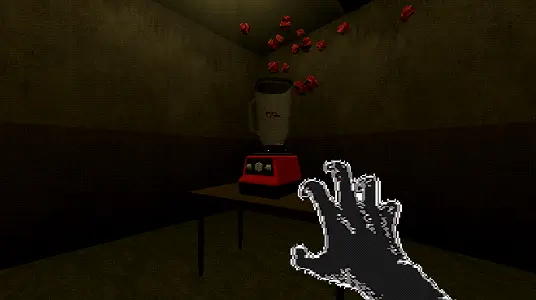
When the Clock Stops screenshot 1: the basement feels cramped, dirty, and built around one miserable routine.
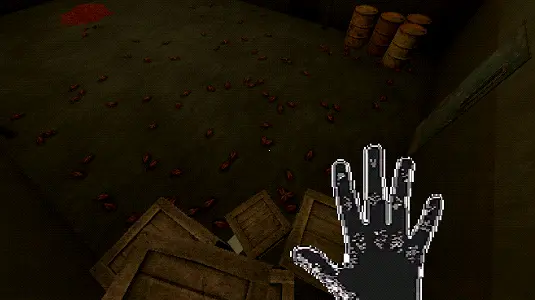
When the Clock Stops screenshot 2: every insect, every corner, and every sound matters more once the cycle tightens.
When the Clock Stops screenshot 3: timing, handling, and upgrades are what keep When the Clock Stops survivable.
When the Clock Stops FAQ
What is When the Clock Stops?
When the Clock Stops is a first-person survival horror game about staying alive in a basement by collecting insects, feeding the pit below the floor, and using upgrades to survive the next cycle.
Can I play When the Clock Stops online here?
Yes. Use the Play button on this page to launch When the Clock Stops through the embedded browser build.
What are the controls for When the Clock Stops?
When the Clock Stops uses W/A/S/D to move, Space to jump, Left Click to catch or pick up insects, Right Click to throw, C to crouch, and Esc to pause.
Is When the Clock Stops a survival horror game?
Yes. When the Clock Stops combines basement horror, retro 3D visuals, resource collection, upgrades, and clock-based pressure around the threat below the floor.
What should I do if When the Clock Stops does not load?
Give When the Clock Stops a few seconds to load, refresh the page once, and check whether browser privacy tools are blocking scripts, storage, or embedded frames.